
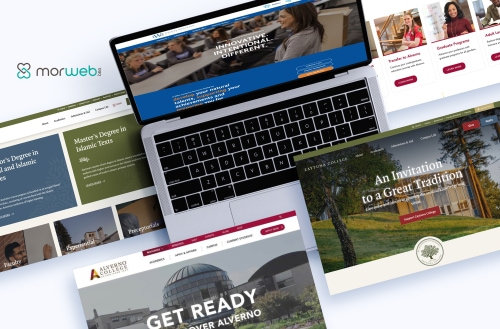
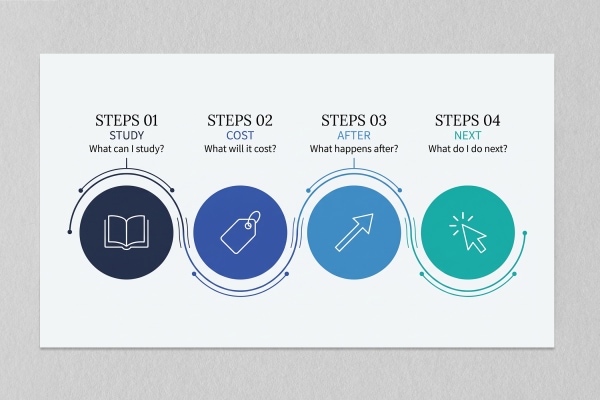
Most lists of the best college websites judge them the way a design awards panel would: big photography, bold color, a slick video. Prospective students judge them differently. They land on the homepage with four questions. Can I study what I want here? What will it cost me? What happens after I graduate? How do I take the next step?
So we tested 14 college websites against exactly those four questions. The group ranged from Ivy-adjacent research universities to small private colleges with a few hundred students. The results surprised us. Almost every homepage made it easy to give money. Only two showed a single number about what happens to students after they graduate. Here is what the strongest college homepages do, where even well-known schools fall short, and a 30-minute checklist you can run on your own site this week.
|
14 college and university homepages audited on September 30, 2026, against the four questions prospective students ask |
2 of 14 showed a student-outcome number (job placement, internship rate) on the homepage |
13 of 14 had a visible Give link. Most homepages ask alumni for money more reliably than they answer prospective students |
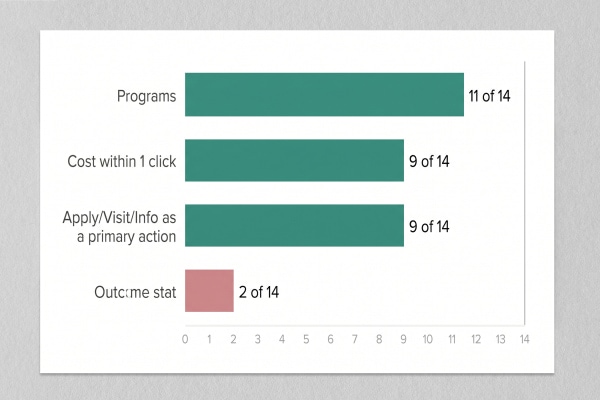
Quick answer: The best college websites answer four questions from the homepage: what you can study, what it will cost, what happens after graduation, and how to take the next step (apply, visit, or ask). In our September 2026 audit of 14 college homepages, most answered the program question well, 9 of 14 linked to cost within one click, and only 2 showed a student-outcome statistic. A college homepage wins when a 17-year-old and their parent can answer all four questions without leaving it.
How Did We Evaluate These College Websites?
We scored each homepage on whether it answers the four questions prospective students bring to it, not on how it looks.
We started from the 23 schools in the previous version of this post and audited every homepage that loaded cleanly on September 30, 2026. Princeton and Juniata blocked our automated review, so we left them out rather than describe them from memory. We also dropped two entries that were never colleges in the first place: a graduate students' association and a university foundation. That left 14 schools, from large research universities (Duke, Georgetown, MIT, the University of Chicago) to small private colleges (Alverno, Dakota Wesleyan, Muhlenberg, Zaytuna).
For each homepage we recorded:
- Programs: can a visitor search or browse academic programs from the homepage?
- Cost: is tuition, cost of attendance, or a net price calculator reachable within one or two clicks? A net price calculator is a tool that estimates what a specific student will actually pay after grants and scholarships.
- Outcomes: does the homepage show any number about what happens to graduates?
- Next step: are Apply, Visit, or Request Info offered as primary actions? Is there a virtual tour?
We also recorded the homepage headline, the audience navigation, and one specific strength and weakness per site. Disclosure: Dakota Wesleyan University and Zaytuna College are Morweb clients, and our team has also done design work for Alverno College. We scored them by the same rules as everyone else and name their gaps below.
Reviewed by Our Team
This audit was reviewed by three specialists who design, build, and measure higher-ed websites. Each brought a different lens to what makes a college homepage work.
 Shawn Xiong, Art Director (Visual Design & Accessibility) - 20 years in visual design and art direction, MFA in Graphic Design. Has led design on 30+ school and nonprofit sites, including Dakota Wesleyan University, Zaytuna College, and Alverno College. Believes accessibility belongs in the first design comp, not the post-launch fix list.
 Bita Goli, Senior Designer (UX & Information Design) - 5+ years in UX, typography, and web design across schools, nonprofits, associations, and healthcare. Specializes in taking complex information, like tuition and aid, and presenting it so a first-time visitor can follow it.
 Steven Calibo, Digital Strategist (SEO & Analytics) - 15 years in digital strategy. Google Analytics, Google Ads, HubSpot, and CRO certified. Looks at which pages prospective students actually reach and where they drop off.
How Did 14 College Websites Score?
Most college homepages handle programs well, split on cost and next steps, and almost all skip outcomes.
The table below shows what we found on each homepage. "Yes" means the homepage answered the question directly. "2 clicks" means the answer existed but sat behind an intermediate page.
|
School |
Programs |
Cost |
Outcome stat |
Apply / Visit / Info |
Virtual tour |
|
Alverno College |
Yes |
Yes |
Yes |
All three |
No |
|
Dakota Wesleyan University |
Yes |
Yes |
Yes |
Apply, Visit |
No |
|
Virginia Commonwealth University |
Yes |
Yes |
No |
Apply, Visit |
Yes |
|
University of Nebraska-Lincoln |
Yes |
Yes |
No |
Apply, Visit |
No |
|
Muhlenberg College |
Yes |
Yes |
Retention only |
Apply |
No |
|
Fashion Institute of Technology |
Yes |
Yes |
No |
Request Info |
Not found |
|
Zaytuna College |
Yes |
Yes |
No |
Apply |
No |
|
Howard University |
Yes |
2 clicks |
No |
Apply, Visit |
Yes |
|
Duke University |
Yes |
Yes |
No |
None |
No |
|
University of Chicago |
Partial |
Yes |
No |
Apply, Visit (in page) |
No |
|
Bates College |
Yes |
2 clicks |
No |
None |
Yes |
|
Georgetown University |
Yes |
Not found (undergrad) |
No |
None |
No |
|
Rhode Island School of Design |
Partial |
2 clicks |
No |
None |
No |
|
MIT |
No |
Not within 2 clicks |
No |
None |
No |
The pattern is clear: the two schools that answered all four questions from the homepage are small private colleges, Alverno and Dakota Wesleyan. Name recognition lets a school like MIT skip the prospective student entirely. A college competing for every enrollment does not have that luxury, and the best small-college sites act like it.
Question 1: Can I Study What I Want Here?
Program search is the one thing most college homepages get right: 11 of the 14 we audited link to a program finder from the homepage.
The strongest versions sort programs by the kind of student looking. The University of Nebraska-Lincoln's "Find your Major" splits undergraduate, graduate, online, and law programs, so an adult learner does not wade through freshman majors. VCU puts a count on it ("200+ degrees and certificates") and a "View all" link right beside it. Dakota Wesleyan does the small-college version: "Explore more than 40 majors and minors."
The outlier is MIT. Its homepage is a daily, date-stamped news "Spotlight" with no program finder and no path for applicants. That works for MIT because nobody needs to be told what MIT teaches. For almost every other college it would be a costly imitation. Copy MIT's editorial freshness if you like, but never copy its indifference to applicants.
Question 2: What Will It Cost Me?
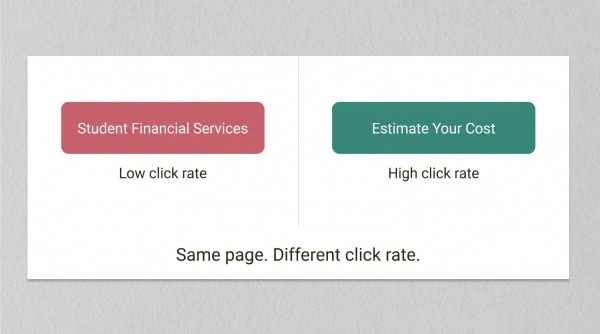
Cost is the question families care about most, and the best college websites label the link with the family's question, not the name of the office that answers it.
Every college that takes part in federal student aid has been required to post a net price calculator on its website since 2011, under the Higher Education Opportunity Act of 2008. So the tool exists on every site in this audit. What varies is whether anyone can find it.
The Fashion Institute of Technology links "Cost of Attendance (COA)" and "Net Price Calculator" straight from the homepage. Muhlenberg does the same with "Net Price Calculator." VCU uses the plainest label we found: "Estimate cost." Nine of the 14 homepages put cost within one click.
The other five show how cost gets buried:
- Office names instead of questions. Bates sends cost through "Student Financial Services." Howard uses "Financial Aid & Bursar." Both reach the answer in two clicks, but a first-generation student may not know what a bursar is.
- Subdomain handoffs. RISD and Howard route cost to separate financial-services subdomains that look and navigate differently from the main site.
- Missing undergraduate path. From Georgetown's homepage we could reach graduate cost of attendance but no undergraduate cost page or net price calculator.
"Label the link with the question the family is asking. 'What will it cost?' or 'Estimate your cost' gets clicked. 'Student Financial Services' gets skipped, because the visitor does not know that is where the answer lives. The information is the same. The label decides whether anyone finds it."
- Bita Goli, Senior Designer
Question 3: What Happens After I Graduate?
Outcomes are the biggest gap on college homepages: only 2 of the 14 we audited showed any number about what happens to graduates.
Dakota Wesleyan University puts it on the homepage: "100% job placement for DWU nursing graduates," alongside a figure that 99% of graduates would recommend the school. Alverno College leads with a "100% internship and clinical placement rate" and reports that 95% of surveyed alumnae feel prepared for their careers. Muhlenberg shows a 91% retention rate, which is useful but describes students who stay, not graduates who succeed.
The other 11 homepages had no outcome number at all. Meanwhile 13 of 14 had a Give link in the header or footer. The typical college homepage is better built to ask a 50-year-old alumnus for money than to tell a 17-year-old what the degree will do for them.
"A college homepage has six audiences: prospective students, parents, current students, faculty, alumni, and donors. The one that keeps the lights on is the prospective student, and most homepages serve them last. If you have a placement rate you are proud of, it belongs above the fold, not in a PDF on the career center page."
- Steven Calibo, Digital Strategist
If you do not publish placement data yet, start with what you can verify: licensure pass rates, internship participation, graduate-school acceptance, or the share of graduates employed or enrolled within six months. Cite the class year and the source office next to the number. An outcome stat without a year reads as marketing. With a year, it reads as evidence.
Why Do So Many College Homepage Headlines Say Nothing?
A college homepage headline should tell a stranger something specific about the school; most in our audit could belong to any university.
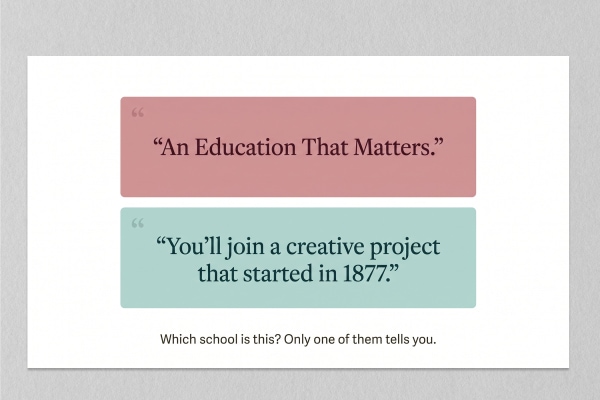
Here are the headlines we recorded: "You Can Do More Here." "An Education That Matters." "Redefine What's Next." "Get Ready to ignite your potential." "Fueled by creativity, informed by scholarship." Swap the logos and nobody would notice. Three homepages (VCU, MIT, and FIT) had no clear text headline at all. VCU's message, "What makes VCU UNCOMMON?", lives inside a video prompt.
Two headlines stood out. RISD opens with a sentence only RISD could write: "At Rhode Island School of Design, you'll join a creative project that started in 1877." Zaytuna College takes the most practical route: "Now Accepting BA and MA Applications," with Apply right beside it. One is a story and one is an instruction. Both are specific.
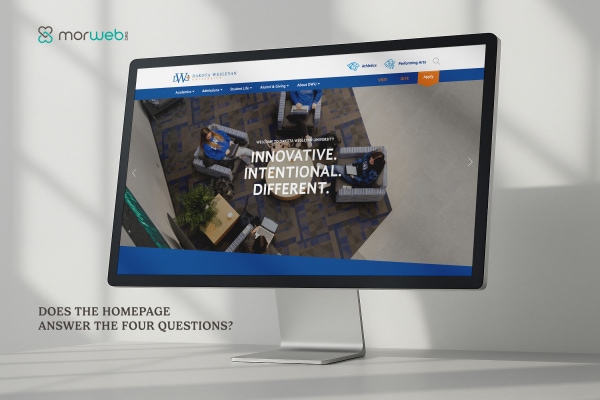
We hold our own clients to the same standard. Dakota Wesleyan's homepage has some of the best proof points in this audit, and its headline is "Welcome to Dakota Wesleyan University." The proof is there. The first line just does not use it.
"When the main message sits inside a video or an image, a screen reader cannot read it and Google cannot index it. Put the headline in real text first, then layer the video behind it. That is an accessibility decision you make in the first design comp, not something you patch after launch."
- Shawn Xiong, Art Director
Question 4: How Do I Take the Next Step?
The best college websites offer three ways to act, Apply, Visit, and Request Info, because prospective students are at different stages of deciding.
Alverno was the only homepage in our audit offering all three together. That matters because most visitors are not ready to apply. A junior in high school wants to request information. A senior comparing finalists wants to visit. Offering only "Apply" skips everyone who is still deciding.
Five homepages (Bates, Duke, Georgetown, MIT, and RISD) put none of the three in the header. Several still offer a visit link lower on the page, like Bates's "Learn About Visiting" and RISD's "Schedule a Tour," but a visitor has to scroll to find it.
Virtual tours are rarer than you might expect: only 3 of 14 homepages linked one (Bates, Howard, and VCU). For a family four states away, a virtual tour is the visit. If you have one, link it from the homepage.
One judgment call worth making on purpose: Muhlenberg's Apply button goes straight to the Common App. That is efficient for a student who has decided. It also skips the admissions page that could answer a last question or two before they leave your site. There is no single right answer, but it should be a decision, not a default.
The 30-Minute College Homepage Checklist
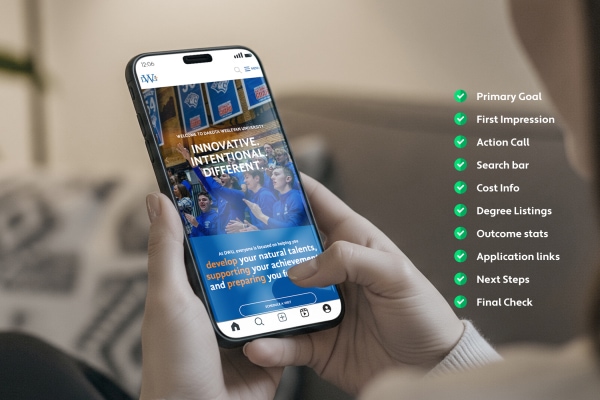
Run your own homepage through the same four questions we used, on a phone, in about 30 minutes.
Open your homepage on your phone, logged out, as if you were a prospective student. Answer each item honestly.
- Headline test. Cover your logo. Could the headline belong to another college? If yes, rewrite it around one specific fact: a program, a place, a number, or a deadline.
- Headline is real text. Make sure the main message is not only inside a video or image.
- Program finder. Can you reach a searchable list of programs in one tap? Is it split by student type (undergraduate, graduate, adult, online) if you serve more than one?
- Cost in one tap. Is there a link labeled with the question, like "Estimate Your Cost," that goes straight to your net price calculator?
- One outcome number. Is at least one verified outcome stat above the fold, with a class year?
- Three next steps. Are Apply, Visit, and Request Info all visible without scrolling?
- Virtual tour. If you have one, is it linked from the homepage?
- Audience paths. If you use audience navigation (Future Students, Parents, Alumni), is "Future Students" first?
- Consistent handoffs. When a link leaves for a subdomain (financial aid, the application portal), does the page still look and navigate like your site?
- Give link placement. Keep Give in the header, but never more prominent than Apply.
College Websites: Common Questions
What makes a good college website?
A good college website answers four questions from the homepage: what you can study, what it will cost, what happens after graduation, and how to apply, visit, or request information. Visual design matters, but in our 2026 audit of 14 college homepages the biggest differences were in how easily a prospective student could find cost and outcome information, not in photography or color.
What are some of the best college websites?
In our September 2026 audit, Alverno College and Dakota Wesleyan University were the only two homepages that answered all four prospective-student questions. VCU, the University of Nebraska-Lincoln, and the Fashion Institute of Technology were strongest on program search and cost access. RISD and Zaytuna College had the most specific homepage headlines.
Do colleges have to put a net price calculator on their website?
Yes. Under the Higher Education Opportunity Act of 2008, every college that participates in federal Title IV student aid has had to post a net price calculator on its website since 2011. The law requires the calculator to exist. It does not require colleges to make it easy to find, which is why placement varies so widely.
What should be on a college homepage?
At minimum: a specific headline in real text, a program finder, a cost link that goes to the net price calculator, at least one verified student-outcome statistic, and Apply, Visit, and Request Info actions. Audience navigation, a virtual tour, news, and a Give link are useful additions, but they should not push those essentials below the fold.
Should a college website use audience-based navigation?
It helps when you serve distinct groups. Seven of the 14 homepages we audited used it, most often with labels like Students, Parents, and Alumni. The key is order and wording: put "Future Students" or "Prospective Students" first, and use the words families use, not internal office names.
Do public universities have website accessibility requirements?
Yes. A 2024 Department of Justice rule under Title II of the ADA requires state and local government entities, including public colleges and universities, to meet WCAG 2.1 Level AA on their websites. Private colleges face accessibility claims under ADA Title III and Section 504. Our post on school website accessibility lawsuits covers the details.
More on building school and college websites that work:
Best School Website Platform: Morweb vs. the Big Three. A weighted comparison of Morweb, Finalsite, Apptegy, and ParentSquare from people who have migrated school sites.
School Website Accessibility Lawsuits Are Rising. What ADA Title II means for school and college websites, and what to fix first.
School Website Examples and What They Get Right. The K-12 companion to this post.

Does your college homepage answer the four questions?
We will run the same audit on your homepage that we ran on these 14: programs, cost, outcomes, and next steps, checked on a phone the way a prospective student sees it. You will get a short, prioritized list of fixes, most of which are content and labeling changes you can make without a redesign.
Request a Free Homepage Review