

Your hospital website is a compliance surface, and most marketing teams do not treat it as one. Two separate bodies of law govern it: HIPAA, which protects patient health information, and the ADA, which requires the site to be accessible to people with disabilities. The features marketing teams add to improve the site, tracking pixels, scheduling widgets, chatbots, and intake forms, are exactly the features that create HIPAA and ADA exposure. The compliance risk does not come from neglect. It comes from ordinary marketing work done without knowing the rules apply.
This is the guide the marketing team usually does not get. We audit healthcare websites for exactly these problems, and the same gaps appear across hospitals, clinics, and health centers: analytics quietly sending patient data to advertising platforms, forms collecting health information over tools with no safeguards, and patient portals and scheduling pages that fail basic accessibility standards. Below is what HIPAA and the ADA actually require of a website, what marketing teams miss, and a checklist to close the gaps.

|
2 laws govern your hospital website at once: HIPAA (patient data) and the ADA (accessibility) |
WCAG 2.1 AA the web accessibility standard federal rules now point to for healthcare |
1 overlooked risk third-party tracking pixels that can send patient information to advertising platforms |
Quick answer: HIPAA and the ADA both apply to a hospital website, and marketing teams most often miss three things. First, third-party tracking technologies like the Meta Pixel and some Google Analytics configurations can disclose protected health information (PHI) to advertising and analytics companies, which regulators have treated as an impermissible disclosure. Second, contact and intake forms frequently collect health information through tools that are not covered by a business associate agreement (BAA), leaving PHI unprotected. Third, patient portals, scheduling pages, and forms must meet web accessibility standards (federal rules now point to WCAG 2.1 Level AA), and accessibility overlay widgets do not satisfy that requirement. The website is a compliance surface, and the features that improve marketing performance are the same ones that create legal exposure.
Note: This post is educational, not legal advice. Healthcare website compliance is governed by federal and state law and by regulatory guidance that changes. Confirm your obligations with your organization's legal counsel or compliance officer before acting.
Why Marketing Teams Miss Website Compliance
Healthcare compliance training focuses on clinical systems, the electronic health record, the patient portal login, the email system. The public marketing website is rarely in scope, so the people who manage it were never told the rules apply to it.
In most healthcare organizations, HIPAA training is aimed at clinical and administrative staff who handle patient records directly. The marketing team, or the agency that built the website, sits outside that training. They think about traffic, conversions, and design. Nobody tells them that adding a Facebook tracking pixel to measure ad performance, or an intake form to capture appointment requests, can create a HIPAA disclosure. The gap is organizational: the people who understand HIPAA do not manage the website, and the people who manage the website do not think HIPAA applies to it.
The ADA gap is similar. Accessibility is often treated as a physical-facility concern (ramps, signage, parking) rather than a digital one. But courts and federal agencies increasingly treat the website itself as subject to accessibility law, and the interactive parts most patients rely on, scheduling, forms, and the patient portal, are the parts most likely to fail. A marketing team optimizing for visual appeal is not thinking about whether a screen reader can complete the appointment form.
"When we audit a healthcare website, the compliance problems are almost never intentional. Someone in marketing added a pixel because the ad platform told them to. Someone added a form because patients asked for online scheduling. Each decision made sense in isolation. Nobody connected it to HIPAA because nobody told them the website was in scope. That disconnect is the root cause of most of what we find."
- Brent Lafreniere, Digital Director
Reviewed by Our Team
This post draws on compliance-focused audits of healthcare websites, platform-level PHI handling and access controls, and privacy-safe analytics configuration.
 Brent Lafreniere, Digital Director (Compliance Auditing) - 19 years in digital across schools, nonprofits, associations, and healthcare. Audits healthcare websites for HIPAA and ADA exposure and leads the remediation. Provides the audit findings and the checklist in this post.
 Murad Bushnaq, CEO & Creative Director (CMS Architecture & PHI Handling) - 25+ years in web design, 15+ across Morweb's four verticals. Provides the platform perspective on access controls, secure forms, and where protected health information is and is not allowed to live.
 Steven Calibo, Digital Strategist (Privacy-Safe Analytics) - 15 years in digital strategy, Google Analytics and Google Ads certified. Configures analytics and marketing tracking that measure performance without disclosing patient data to third parties. Provides the tracking-technology guidance in this post.
What Does HIPAA Actually Require of a Hospital Website?
HIPAA requires that protected health information collected, stored, or transmitted through your website is safeguarded and never disclosed to third parties without authorization. The trigger is not the page. It is the presence of PHI.
HIPAA (the Health Insurance Portability and Accountability Act of 1996) is the federal law that protects patient health information. It applies to "covered entities," which include most healthcare providers, and to their "business associates," the vendors that handle protected health information on their behalf. Protected health information (PHI) is any information that can identify a person and relates to their health, care, or payment for care. On a website, PHI can appear the moment a patient enters their name alongside a reason for a visit, requests an appointment for a specific condition, or logs into a portal.
The HHS Office for Civil Rights (OCR) enforces HIPAA. The website obligations that matter most for a marketing team are three: do not disclose PHI to third parties (including analytics and advertising vendors) without a BAA and proper authorization, protect PHI in transit and at rest (encryption, access controls), and ensure any vendor that touches PHI has signed a business associate agreement. A BAA is a contract that binds a vendor to HIPAA's safeguards. Without one, sending PHI to that vendor is an impermissible disclosure.
Where PHI Shows Up on a Website
- Contact, appointment-request, and intake forms that ask about symptoms, conditions, or reason for visit.
- Patient portals and any logged-in area.
- Chatbots and live-chat tools that collect health details.
- Analytics and advertising trackers that capture what a patient viewed or entered.
- Anything that combines an identifier (name, email, IP address in some contexts) with health context.
The Tracking Pixel Problem: How Marketing Tools Leak Patient Data
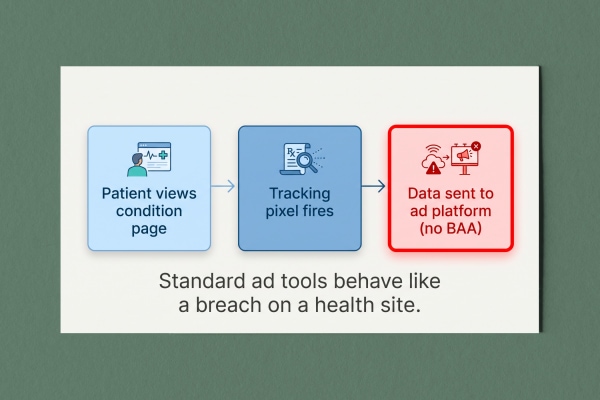
Third-party tracking pixels are the most common and most overlooked HIPAA risk on healthcare websites. A pixel added to measure ad performance can transmit what a patient did on your site to an advertising company, and regulators have treated that as an impermissible disclosure of PHI.
A tracking pixel is a small piece of third-party code (from Meta/Facebook, Google, or another platform) that reports visitor activity back to that platform for advertising and analytics. On a retail site, that is routine. On a healthcare site, the same pixel can capture a patient viewing a page about a specific condition, booking an appointment, or entering information into a form, and send it to a company that has not signed a BAA. In 2022, the HHS Office for Civil Rights issued guidance (updated in 2024) warning that tracking technologies on healthcare websites and portals can result in impermissible disclosures of PHI. The regulatory picture has since been shaped by litigation, and the rules around unauthenticated public pages specifically have been contested in court, which is exactly why this requires review with counsel rather than a blanket assumption.
What is not contested is the exposure. Healthcare systems have faced class-action lawsuits and multimillion-dollar settlements after tracking pixels were found sending patient data to advertising platforms. The organizations were not trying to sell patient data. Their marketing teams installed standard advertising tools without realizing that on a healthcare site, standard tools behave like a data breach.
What to Check
- Is a Meta Pixel, Google Ads tag, or other advertising tracker installed on pages about conditions, services, scheduling, or the patient portal?
- Does your analytics configuration capture URLs, form fields, or search terms that could contain health context or identifiers?
- Have you signed a BAA with every vendor that could receive that data? (Most advertising platforms will not sign one, which is the tell that they should not receive PHI.)
"You can measure a healthcare website's performance without leaking a single patient's data. The fix is configuration, not going blind. That means analytics set up to avoid capturing PHI, no advertising pixels on sensitive pages and portals, IP handling reviewed, and no vendor receiving health data unless they have signed a BAA and are contractually bound to protect it. Most healthcare sites we audit are one afternoon of cleanup away from closing the biggest gap they have."
- Steven Calibo, Digital Strategist
Forms, Portals, and Where PHI Is Allowed to Live
If a form on your website collects health information, that data has to be handled by tools bound by a BAA and protected in transit and storage. A generic form plugin that emails submissions in plain text is a HIPAA problem waiting to be found.
Marketing teams add forms to help patients: request an appointment, ask a question, contact a department. The moment a form asks for a reason for the visit, a symptom, or a condition, alongside a name or contact detail, it is collecting PHI. The compliance question is what happens to that submission. Many website forms email the data to staff in plain text, store it in a general-purpose database, or route it through a third-party form service that never signed a BAA. Each of those is a potential impermissible disclosure.
The platform architecture matters here. A healthcare website needs forms that can be configured to handle sensitive data appropriately: encrypted transmission, controlled access to submissions, no plain-text email of PHI, and a vendor relationship covered by a BAA. Patient portals and any logged-in area raise the bar further, with authentication, access controls, and audit logging. This is where the difference between a general-purpose CMS bolted together from plugins and a platform with proper access controls becomes a compliance issue, not just a convenience one.
What to Check
- Do any forms collect symptoms, conditions, or reason for visit? If so, how is the submission transmitted, stored, and accessed?
- Are form notifications emailed in plain text to staff inboxes? (PHI in plain-text email is a common finding.)
- Is every tool in the form pipeline covered by a BAA?
- Who can view form submissions, and is that access controlled and logged?
"The safest design choice is often to collect less. A public website form does not need a patient's full medical history to route an appointment request. When we design healthcare forms, we ask what the minimum necessary information is, keep PHI out of plain-text email entirely, and make sure access to any sensitive submission is controlled at the platform level. The architecture decides whether a form is a service or a liability."
- Murad Bushnaq, CEO & Creative Director
What Does the ADA Require of a Hospital Website?
The ADA requires that your website be accessible to people with disabilities, and federal rules for healthcare now point to the WCAG 2.1 Level AA standard. The interactive parts patients depend on, scheduling, forms, and the portal, are where accessibility most often fails.
The Americans with Disabilities Act (ADA) prohibits discrimination on the basis of disability. Title III applies to places of public accommodation, which courts have widely applied to the websites of private healthcare providers. For public (government-run) hospitals and health departments, the Department of Justice issued a rule in 2024 under Title II requiring web content to conform to WCAG 2.1 Level AA, with compliance deadlines phased by entity size. Separately, HHS finalized a rule under Section 1557 of the Affordable Care Act addressing the accessibility of health programs and activities, including websites and mobile apps, and pointing to the same WCAG standard. The practical takeaway is consistent across these rules: WCAG 2.1 Level AA is the benchmark.
WCAG (the Web Content Accessibility Guidelines) is the internationally recognized standard for web accessibility, organized around four principles: content must be perceivable, operable, understandable, and robust. Level AA is the conformance level regulators reference. In healthcare, the stakes are higher than on a typical site, because the people most likely to rely on accessibility features, older patients, patients with visual or motor impairments, patients managing chronic conditions, are disproportionately the people trying to schedule care or use the portal.
Where Healthcare Sites Most Often Fail WCAG
- Appointment scheduling and intake forms that cannot be completed with a keyboard or screen reader.
- Patient portal login and navigation that is not accessible.
- Insufficient color contrast on critical text and buttons.
- Images (including text baked into images) with no alternative text.
- PDFs (forms, instructions, notices) that are not tagged for accessibility.
- Video content (patient education, provider intros) without captions.
Why Accessibility Overlay Widgets Are Not Compliance
An accessibility overlay, the pop-up widget that promises instant compliance, does not make a website compliant and has been named in accessibility lawsuits rather than preventing them. Real accessibility is built into the site, not bolted on.
Accessibility overlays are third-party widgets that add an accessibility menu to a site and claim to fix accessibility automatically. They are appealing because they promise a fast, cheap fix for a hard problem. But advocacy organizations, accessibility experts, and many users who rely on assistive technology have rejected them, because they do not fix the underlying code and can interfere with the screen readers and tools patients already use. Overlays have been cited in web accessibility lawsuits, not as a defense but as part of the problem.
Compliance comes from accessible design and code: semantic structure, keyboard operability, sufficient contrast, alternative text, accessible forms, and tagged documents. There is no widget shortcut. For a healthcare organization, the overlay is a false sense of security that leaves the actual barriers, especially in scheduling and the portal, fully in place.
The Hospital Website Compliance Checklist
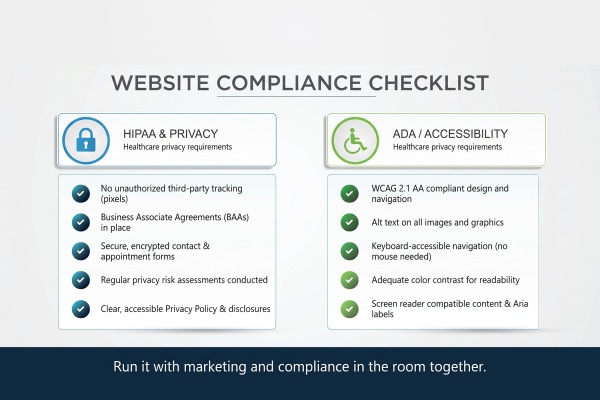
Run your website through this checklist with your marketing team and compliance officer together. Each item maps to a requirement above. This is a starting audit, not a substitute for legal review.
HIPAA
- Inventory every third-party script on the site (analytics, advertising pixels, chat, scheduling, maps, embeds). Know what each one sends and where.
- Remove advertising trackers from pages about conditions and services, from forms, and from the patient portal, or confirm with counsel what is permissible.
- Confirm a signed BAA exists for every vendor that could receive PHI. If a vendor will not sign one, it should not receive patient data.
- Review analytics configuration so it does not capture PHI in URLs, form fields, or search terms.
- Audit every form for health information collection, and confirm secure transmission, controlled access, and no plain-text PHI email.
- Verify encryption (HTTPS everywhere) and access controls on any logged-in area.
ADA / Accessibility
- Test scheduling, intake forms, and the patient portal with a keyboard and a screen reader.
- Check color contrast on critical text and buttons against WCAG 2.1 AA.
- Add alternative text to images; avoid text baked into images.
- Tag PDFs for accessibility, or replace them with accessible web pages.
- Caption videos.
- Remove reliance on any accessibility overlay widget as a compliance measure.
Common Healthcare Website Compliance Mistakes
The same avoidable mistakes show up across healthcare website audits. Each comes from treating the marketing website as separate from compliance.
- Assuming the EHR vendor handles it. The electronic health record system's compliance does not extend to the public marketing website. They are separate systems with separate obligations.
- Installing ad pixels because the ad platform said to. Standard advertising setup instructions are written for retail, not healthcare. On a health site, they can create a disclosure.
- Emailing form submissions in plain text. A convenient default that routinely puts PHI in staff inboxes with no protection.
- Buying an accessibility overlay and calling it done. It does not achieve compliance and can make the experience worse for the patients it claims to help.
- Treating accessibility as a one-time project. Every new page, form, PDF, and video can reintroduce barriers. Accessibility is ongoing.
- Keeping marketing and compliance in separate rooms. The gaps live precisely in the space between the team that manages the site and the team that understands the law.
Hospital Website HIPAA and ADA Compliance: Common Questions
Does HIPAA apply to my hospital's public website?
HIPAA applies whenever your website collects, stores, or transmits protected health information (PHI). A purely informational page with no data collection and no tracking of patient activity carries little HIPAA risk. But the moment a form collects health information, a portal handles patient logins, or a tracker captures what patients viewed or entered, PHI is in play and HIPAA's safeguards apply. Confirm your specific obligations with your compliance officer or counsel.
Are Google Analytics and the Meta Pixel HIPAA compliant?
Not by default on a healthcare site. Standard advertising and analytics trackers can capture patient activity and send it to companies that have not signed a business associate agreement (BAA), which regulators have treated as an impermissible disclosure of PHI. Most advertising platforms will not sign a BAA, which is the signal that they should not receive patient data. Analytics can sometimes be configured to avoid capturing PHI, but that requires deliberate setup and review, not the default install.
What is a business associate agreement (BAA) and when do I need one?
A business associate agreement is a contract that binds a vendor handling PHI on your behalf to HIPAA's safeguards. You need one with any vendor whose tools could receive protected health information through your website, including certain analytics, form, chat, or hosting providers. If a vendor cannot or will not sign a BAA, sending PHI to that vendor is not permissible.
What accessibility standard does my healthcare website need to meet?
Federal rules for healthcare now point to WCAG 2.1 Level AA (the Web Content Accessibility Guidelines). The Department of Justice's 2024 ADA Title II rule requires this level for public entities on a phased timeline, and HHS's Section 1557 rule addresses accessibility of health programs including websites. For private providers, courts have applied ADA Title III to websites, and WCAG 2.1 AA is the practical benchmark. Verify the rules and deadlines that apply to your organization with counsel.
Do accessibility overlay widgets make my site ADA compliant?
No. Accessibility overlays do not fix the underlying code, are rejected by many users of assistive technology, and have been cited in accessibility lawsuits rather than preventing them. Real compliance comes from accessible design and code: keyboard operability, sufficient contrast, alternative text, accessible forms, and tagged documents. There is no widget shortcut.
Who should own website compliance in a healthcare organization?
It should be shared, and that is the point. Marketing owns the website, but compliance owns the rules, and the gaps live between them. The most reliable arrangement is a standing review where the marketing or web team and the compliance officer evaluate the site together, especially before adding any new tracker, form, embed, or third-party tool. Neither team can catch these issues alone.
More on evaluating and protecting your healthcare website:
Website Vendor Red Flags: What to Watch for Before You Sign. The vendor and contract due diligence that matters, including confirming a vendor will sign a BAA before they touch patient data.
When a Plugin-Dependent CMS Stops Working. Why a website assembled from third-party plugins is harder to keep secure and compliant than a platform with native access controls.
The Website Trust Checklist. The trust and transparency signals patients and donors check, which sit alongside compliance as reasons a healthcare site earns confidence.

Is your website a compliance surface you never audited?
Our team will review your site's third-party trackers, forms, and accessibility against the HIPAA and ADA gaps described in this post, and give you a plain-language findings list to bring to your compliance officer. A starting audit, not legal advice, but a clear picture of where the exposure is. No pitch unless you ask for one.