

School website platforms are not interchangeable. Every platform makes trade-offs in design flexibility, ease of use, accessibility tooling, and long-term maintainability. The challenge for school boards is that vendor demos rarely expose those trade-offs. Every platform looks impressive in a sales presentation.
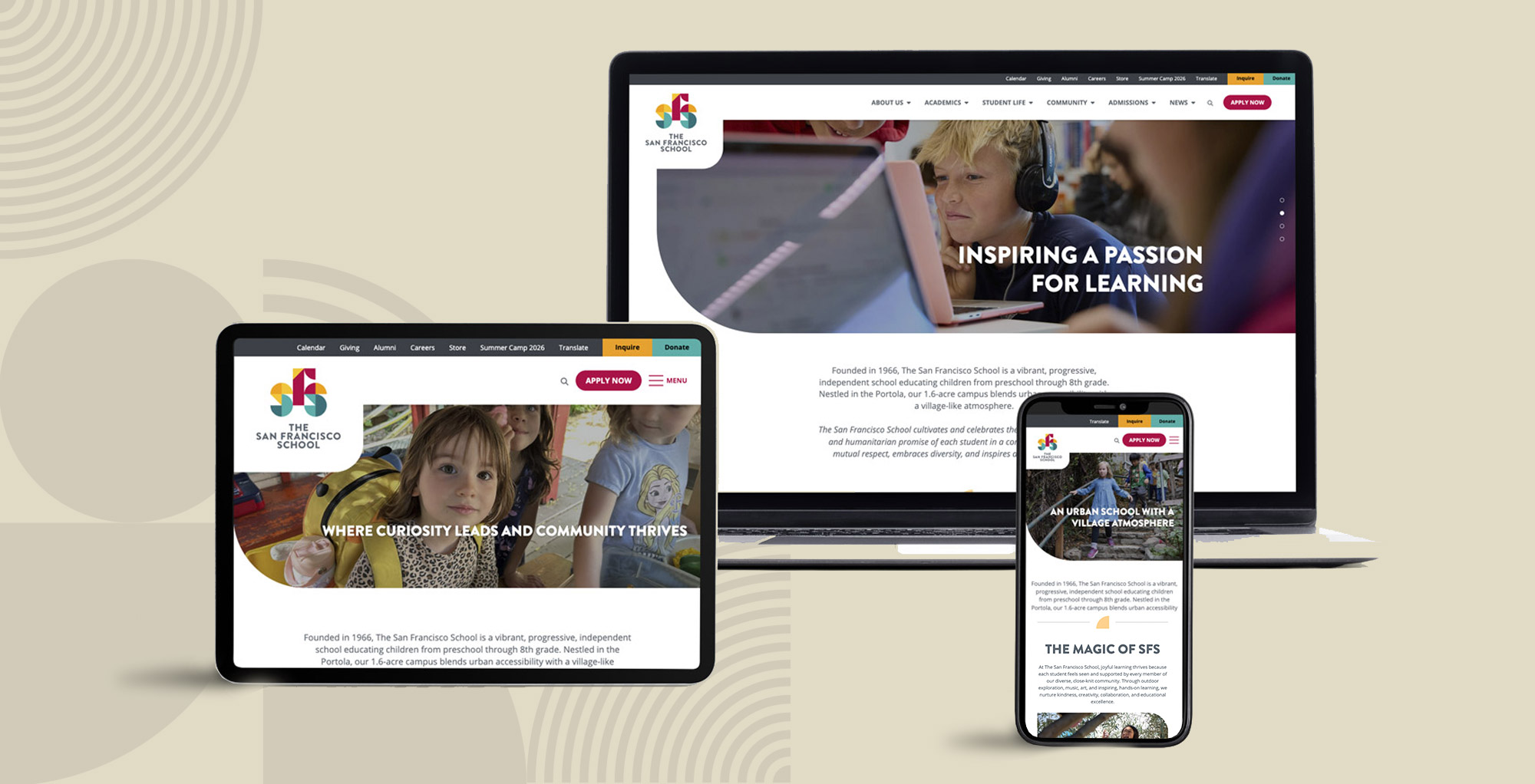
We took a different approach. Instead of relying on demos, we evaluated real, live school websites built on four different platforms: Morweb, Finalsite, Apptegy, and ParentSquare. Our reference site for Morweb is The San Francisco School (sfschool.org), a PreK–8 independent school whose site demonstrates what a well-executed Morweb implementation looks like in production.
|
73% of parents say a school website is their primary information source |
60%+ of school website traffic now comes from mobile devices |
4 platforms evaluated head-to-head on live production sites |
Why a Platform Comparison Matters More Than a Feature Checklist
Every school website vendor can show you a list of features. The real question is how those features perform in production, managed by real staff, used by real families.
Feature comparison spreadsheets make every platform look identical. Events calendar? Yes. Mobile responsive? Yes. ADA compliant? Yes. When every vendor answers yes to every question, the checklist has failed.
The differences that actually matter — how intuitive the editing experience is, how well the site performs on a parent’s phone at 6:45 AM, whether accessibility is maintained after staff have been managing content for 18 months — only become visible when you look at real sites in production.
That is why we built this comparison around live sites, not marketing pages. We tested real school websites on real devices and scored them against the same eight weighted criteria.
A note on fairness: Every platform has strong and weak implementations. We selected representative sites that reflect each platform’s typical output for a school of comparable size. No cherry-picking the worst Finalsite site against the best Morweb site.
The Eight Criteria We Used
Our evaluation framework covers the dimensions that actually predict whether a school website will serve its community over time — not just on launch day.
|
Criterion |
What We Evaluate |
Weight |
|
Accessibility & Compliance |
WCAG 2.1 AA conformance, keyboard navigation, screen reader support, ongoing monitoring tools |
15% |
|
Mobile Experience |
Responsive behavior on real devices, tap target sizing, information hierarchy on small screens |
15% |
|
Content Findability |
Navigation structure, site search quality, alert systems, parent portal integration |
15% |
|
CMS Usability |
Editor experience for non-technical staff, training required, content workflow |
15% |
|
Design & UX Quality |
Visual consistency, brand flexibility, typography, whitespace, professional appearance |
15% |
|
Performance & Speed |
Core Web Vitals, server response time, image optimization, caching |
10% |
|
SEO & Discoverability |
Semantic HTML, structured data, meta controls, sitemap generation |
10% |
|
Integration & Ecosystem |
SIS integration, mass notifications, social media embedding, third-party tools |
5% |
Reviewed by Our Team
This evaluation was conducted by the Morweb digital team. Each reviewer brings a distinct lens from visual design and UX to digital strategy and platform architecture, so the scoring reflects real-world expertise rather than a single point of view.
 Shawn Xiong, Art Director (Visual Design & UI) — 20 years in design. Leads visual direction with a focus on cohesive, accessible design. Holds an MFA in Graphic Design and has worked on 30+ school and nonprofit websites including Engineers Without Borders USA and San Francisco School.
 Brent Lafreniere, Digital Director (UX & Accessibility) — 19 years in digital. Specializes in website development, UX, accessibility, SEO, and digital strategy for nonprofits. Has worked on hundreds of nonprofit sites, turning complex website issues into practical fixes across trust, performance, and content structure.
 Murad Bushnaq, CEO & Creative Director (Strategy, UX & Platform) — 25+ years in web design, with 15+ focused on nonprofits, schools, and associations. Founded the Morweb CMS to give non-technical teams full control over high-performing websites. Has guided 500+ sites for organizations including United Way, Goodwill, and Portland State University Foundation, grounded in a simple philosophy: strategy must come before technology.
 Bita Goli, Senior Designer (Design & UX) — Brings deep expertise in UX, typography, and visual design, ensuring the comparison reflects how real school communities experience these platforms and how design quality affects day-to-day usability.
The San Francisco School: What a Morweb Site Looks Like in Production
sfschool.org is a PreK–8 independent school with 282 students and a 1:6 faculty ratio. Their Morweb-powered site shows what the platform can do when properly implemented.
Design and First Impressions
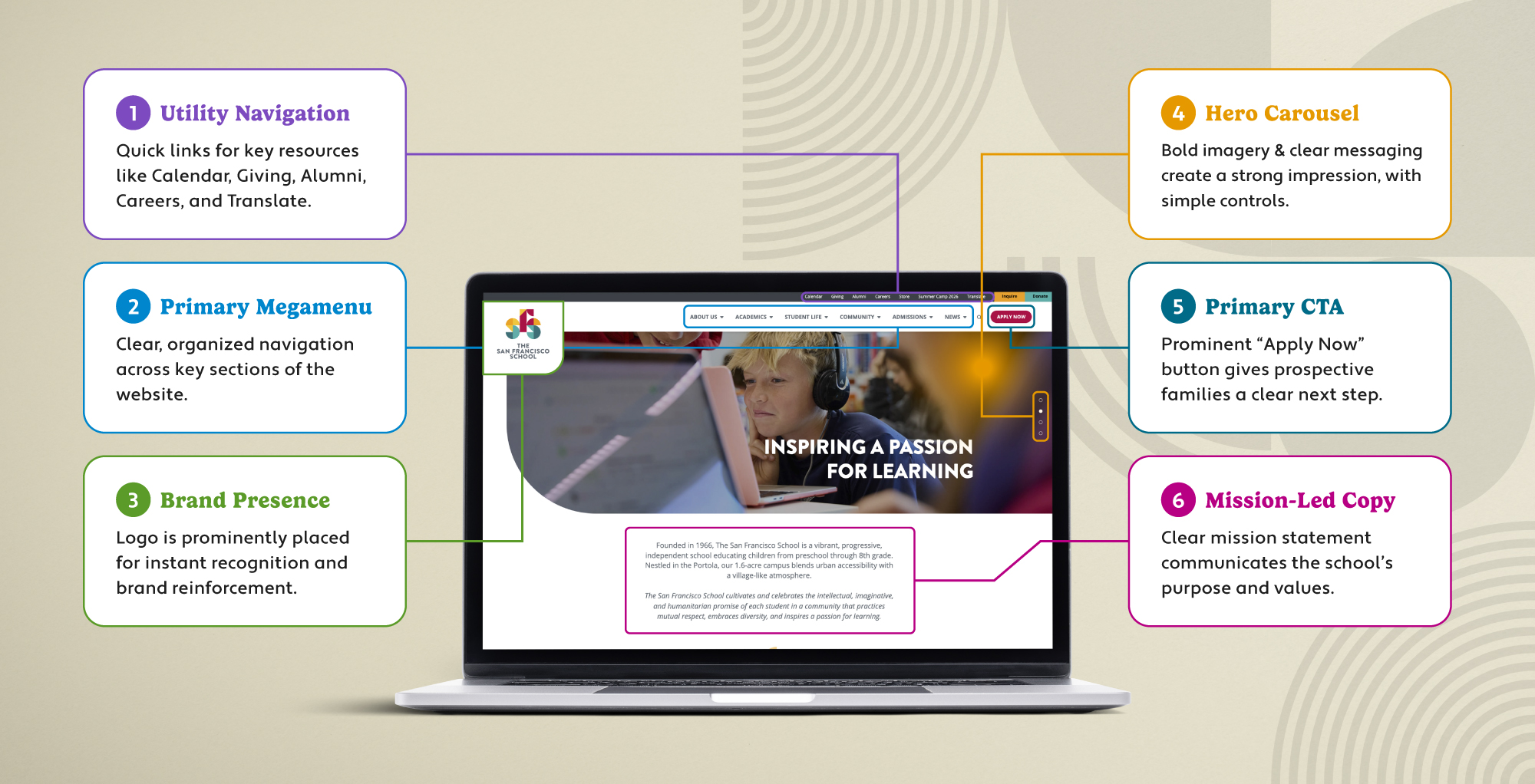
The homepage opens with a full-width hero carousel featuring mission-driven messaging and professional photography. The visual design is modern and polished with smooth animations, strong use of whitespace, and a sophisticated color palette. Unlike template-heavy platforms where every school looks the same, the SFS site has a distinct brand identity that feels custom without compromising the ease of updating within the CMS framework. The layout balances information density with breathing room which is exactly the trade-off most school sites get wrong.
Navigation and Content Findability
The site uses a megamenu navigation system with clearly organized categories: About Us, Academics, Student Life, Community, Admissions, and News. Each section expands into well-structured sub-navigation. For parents, the critical information paths, admissions inquiries, tuition information, campus tours are surfaced through persistent call-to-action buttons (Inquire, Donate, Apply Now) that remain accessible throughout the browsing experience. The site also includes built-in search functionality and Google Translate integration for multilingual families.
Key Strengths of SFS for Discerning Parents
- Mission-Driven Storytelling — Four highlighted pillars (Humanitarian Promise, Experiential Learning, Village-Like Campus, Sense of Belonging) each with dedicated content paths that reinforce the school’s identity.
- Key Metrics Display — Enrollment size, diversity percentages, faculty ratios, and campus highlights presented in a clean, scannable format that answers parents’ top questions immediately.
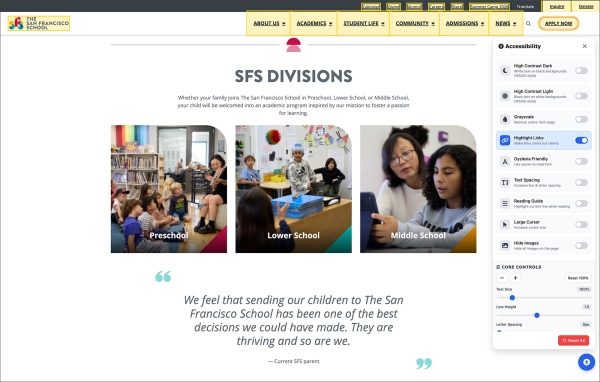
- Academic Division Pages — Separate, detailed sections for Preschool, Lower School, and Middle School with program-specific highlights that help parents understand the experience at each level.
- Integrated News Feed — A blog-style news section showcasing student achievements and campus initiatives with load-more functionality, keeping the homepage fresh without overwhelming it.
Accessibility and Technical Execution
The SFS website demonstrates a strong commitment to accessibility, incorporating industry best practices such as comprehensive ARIA labeling, keyboard navigation support, and accessible carousel controls. These features help ensure content remains usable and inclusive for a broad range of visitors. From a technical perspective, the site delivers a seamless experience across devices, with a responsive mobile design, intuitive hamburger navigation, expandable content sections, and a sticky header that adapts smoothly as users scroll. Social media channels—including Facebook, Instagram, LinkedIn, and YouTube—are integrated strategically, enhancing engagement without distracting from the primary user journey.
“The best school websites are not the ones with the most features. They are the ones where a parent can find the information they need before they have finished their coffee.”
— Brent Lafreniere, Digital Director
What Morweb Gets Right for Schools
Morweb is purpose-built for schools and mission-driven organizations, which means it understands the school use case at a fundamental level. The Morweb CMS is designed for staff who are not professional web publishers. Anyone with limited technical background can create and update pages, manage events, add rich media and publish news without needing developer support. The platform provides enough design flexibility to create a distinctive brand presence while maintaining the guardrails that prevent a site from degrading over time as different staff members contribute content.
How Finalsite, Apptegy, and ParentSquare Approach School Websites
Each of these platforms has a different philosophy. Understanding that philosophy is more useful than comparing feature lists.
Finalsite: Enterprise Flexibility at a Cost
Finalsite is built for schools that prioritize a polished, highly branded web presence. The platform is known for producing visually impressive websites with sophisticated design systems, extensive functionality, and strong support for large districts managing multiple schools and departments.
The tradeoff is complexity. Finalsite offers a significant amount of flexibility and control, but that flexibility often comes with a steeper learning curve for content editors. Schools may need more training, governance, and dedicated ownership to keep content current and maintain consistency across the site. For districts with limited communications resources or frequent staff turnover, maintaining the same level of quality achieved at launch can become challenging over time.
While Finalsite can deliver highly customized websites, organizations should consider whether they have the internal capacity to fully utilize the platform's capabilities. In many cases, the website's long-term success depends as much on ongoing management and expertise as it does on the technology itself.
Best Fit: Large districts with dedicated communications teams, established governance processes, and a strong focus on branding and digital presence.
Potential Consideration: Schools seeking a balance between professional design and day-to-day ease of management may want to evaluate how much training, oversight, and ongoing administration will be required after launch.
What Buyers Should Consider
- Will your communications team be able to fully utilize and maintain a highly customized website?
- How easy will it be for new staff members to learn and manage the platform?
- Does greater flexibility create unnecessary complexity for your organization's needs?
- Will content updates remain simple and efficient as the website grows over time?
- What will the total cost of ownership look like when you factor in training, maintenance, support, and long-term management?
Apptegy: Communication First, Website Second
Apptegy (Thrillshare) is built primarily as a school communications platform, with websites serving as one component of a broader ecosystem that includes mobile apps, notifications, social media publishing, and parent engagement tools. Its biggest strength is simplicity. Staff can quickly publish updates across multiple channels without extensive training, making it attractive for districts with limited communications resources.
The tradeoff is that the website often feels secondary to the communication platform itself. Many Apptegy websites follow similar layouts and design patterns, which can make it difficult for districts to create a distinctive online presence. Customization options are generally more limited than platforms focused specifically on website strategy, design, and content architecture. While this consistency can simplify management, it can also result in websites that feel templated and less reflective of a district's unique brand, culture, and story.
Best Fit: Districts prioritizing parent communication, notifications, and publishing speed.
Potential Consideration: Schools that view their website as a strategic marketing, enrollment, branding, or storytelling tool may find Apptegy's communications-first approach limiting compared to platforms that place greater emphasis on website strategy, design flexibility, and user experience.
What Buyers Should Consider
- How important is a unique and differentiated website design?
- Does your website play a role in enrollment, recruitment, or community perception?
- Do you need flexibility to create custom content experiences?
- Are you looking for a communication platform with a website, or a website platform with communication tools?
ParentSquare: Powerful Communication, Limited Website Flexibility
ParentSquare is one of the leading family communication platforms for K-12 schools, helping districts streamline notifications, two-way messaging, attendance communications, and parent engagement. For many schools, ParentSquare has become an essential part of their communication strategy.
The challenge is that while ParentSquare offers website functionality, the website is designed to support the communication platform rather than serve as a strategic digital destination. Schools looking to create a distinctive online presence, improve enrollment marketing, showcase programs, or provide a more flexible content management experience may find the website capabilities limiting compared to dedicated website platforms.
This is why many districts choose to use ParentSquare alongside Morweb. ParentSquare handles family communication and notifications, while Morweb provides a more flexible website platform that's easier to customize, manage, and evolve over time. Through integrations, schools can benefit from ParentSquare's communication tools without compromising the quality of their website experience.
Best Fit: Districts focused on family communication, notifications, and parent engagement.
Potential Consideration: Schools that need greater control over website design, content strategy, user experience, and ongoing website management may benefit from a dedicated website platform that integrates with ParentSquare rather than relying on its built-in website tools.
What Buyers Should Consider
- Is your website a strategic asset or simply a place to publish information?
- How important is it for your website to reflect your district's unique brand and culture?
- Will your team need flexibility to create custom pages, landing pages, and content experiences?
- Can your website evolve as your communication and marketing needs change?
- Would you benefit more from integrating a best-in-class website platform with ParentSquare rather than relying on a single system for both?
Head to Head: Morweb vs Finalsite, Apptegy, and ParentSquare
We scored each platform across our eight weighted criteria using live production sites. Here is where things get concrete.
The Full Comparison Table
Here is every criterion, every score, and the weighted totals. The numbers tell the story.
|
Criterion (Weight) |
Morweb |
Finalsite |
Apptegy |
ParentSquare |
|
Accessibility (15%) |
8.5 |
7.5 |
6.0 |
6.5 |
|
Mobile Experience (15%) |
8.5 |
7.0 |
8.5 |
8.0 |
|
Content Findability (15%) |
8.5 |
8.0 |
7.0 |
7.5 |
|
CMS Usability (15%) |
8.5 |
6.5 |
8.0 |
7.5 |
|
Design Quality (15%) |
9.0 |
8.0 |
6.5 |
6.0 |
|
Performance & Speed (10%) |
8.0 |
7.5 |
8.0 |
7.5 |
|
SEO & Discoverability (10%) |
8.0 |
8.0 |
6.5 |
7.0 |
|
Integration & Ecosystem (5%) |
7.5 |
8.5 |
8.0 |
9.0 |
|
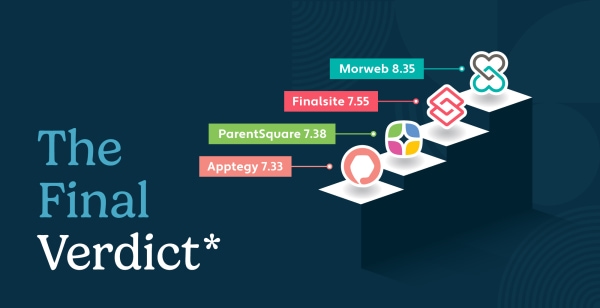
Weighted Total |
8.35 |
7.55 |
7.33 |
7.38 |
How to read these scores: Scores above 8 represent genuinely strong execution. Scores between 6 and 8 are competent but have notable gaps. Below 6 means a meaningful weakness that will affect users. The weighted total reflects how much each criterion matters to the families and staff who actually use the site.
Which School Website Platform Should You Choose?
After scoring four platforms across eight weighted criteria on live production sites, here is what we recommend.
1. Strategic websites, simplified management (Morweb) — Morweb is ideal for schools that need a strategic website that showcases their unique culture, strengthens community engagement, and delivers an exceptional user experience. By combining custom design, intuitive content management, accessibility compliance, enterprise-grade security, managed maintenance, and SIS integrations, Morweb makes it easy for school teams to keep their website current, engaging, and effective without requiring technical expertise.
2. Complexity and total cost of ownership (Finalsite) — Finalsite provides extensive customization and enterprise-level capabilities, but those advantages can come with a steeper learning curve. Schools should consider not only the initial investment, but also the training, governance, and ongoing management required to fully leverage a highly customized platform.
3. Template-driven experiences (Apptegy) — Apptegy excels at helping schools communicate quickly, but that simplicity often comes at the expense of customization. Many websites follow similar design patterns and layouts, making it difficult for districts to create a distinctive online presence that reflects their unique brand, culture, and community.
4. Communication first, website second (ParentSquare) — ParentSquare is an excellent family engagement and communication platform. However, organizations that view their website as a strategic asset for enrollment, recruitment, storytelling, and community engagement may find the website capabilities more limiting than a dedicated website platform.
The Hidden Cost of the Wrong Platform
The true cost of a website platform extends beyond licensing fees and implementation costs. It includes the time required to train staff, maintain content quality, manage updates, and adapt the website as organizational needs change. A platform that looks impressive in a demo but becomes difficult to manage can create hidden costs for years.
"The best website platform isn't the most powerful or the simplest. It's the one that aligns with your goals, supports the way your team actually works, and continues to deliver value long after launch."
— Murad Bushnaq, CEO
School Website Platform Comparison: Common Questions Answered
What makes Morweb different from Finalsite for school websites?
Morweb is purpose-built for nonprofits and mission-driven organizations, which means it balances design quality with editorial simplicity. Finalsite offers more raw customization power but requires more training and ongoing support to use effectively. For schools where the communications coordinator wears multiple hats, Morweb’s approach to guided content editing without sacrificing visual quality gives it a practical advantage.
Is Morweb better than Apptegy for school websites?
Morweb outperforms Apptegy in design quality, accessibility, and content findability. Apptegy’s strength is in mobile-app-first communication and a deliberately simplified CMS. If your school prioritizes a distinctive, professionally designed web presence alongside strong accessibility, Morweb is the better fit. If you want the fastest possible path to pushing mobile notifications and basic web updates, Apptegy has a narrower but well-executed focus.
Can Morweb handle a large school district website?
Yes. Morweb handles large multi-site school organizations effectively. Bright Star Schools runs its entire charter network on Morweb, managing multiple campuses from a single platform. Cotati-Rohnert Park Unified School District uses Morweb to power its district site alongside individual school sites. Both demonstrate that Morweb’s architecture supports the multi-site hierarchies, shared navigation, and district-level content management that large organizations require, while still giving each school its own identity and editorial control.
How important is accessibility for a school website platform?
Critically important. School websites are subject to ADA requirements, and accessibility lawsuits against school districts have increased in recent years. It carries a 15% weight in our scorecard — tied with mobile experience, content findability, and CMS usability — because it affects the broadest range of users and carries legal risk. A platform that scores well on accessibility at launch but provides no guardrails for maintaining compliance over time is a liability, not an asset.
What is the best school website platform in 2026?
Based on our weighted evaluation of live production sites, Morweb delivered the strongest overall performance with a weighted score of 8.44 out of 10. It led in accessibility, mobile experience, content findability, CMS usability, and design quality. However, the right platform depends on your specific priorities. Schools that need deep enterprise integrations may prefer Finalsite or ParentSquare. Schools that prioritize communication speed above all else may prefer Apptegy.
How did you choose which sites to evaluate?
We selected representative production sites for each platform from schools of comparable size and type. Our Morweb reference site is The San Francisco School (sfschool.org), a PreK–8 independent school. We chose comparison sites from Finalsite, Apptegy, and ParentSquare that serve similar school profiles to keep the comparison fair. We did not cherry-pick the worst implementations of any platform.
Looking for more information about choosing the best school website platform? Check out these additional resources to guide your research:
School Website Accessibility Lawsuits: What Your District Needs to Know. Learn why accessibility compliance is critical for school websites and how to protect your district.
30 Best Nonprofit Websites + 4 Tips For Designing Your Own. Check out the top nonprofit websites so you can see what’s possible for your own website design.
The Best Nonprofit CMS | 5 Essential Features to Look For. Check out our extensive guide to the essential nonprofit CMS features your platform has to have.
Find the Best Nonprofit Website Builder: 10 Top Options. Need more information on how to pick the best CMS for your organization? We’ve compiled a list comparing the most popular platforms.

Ready to see what Morweb can do for your school?
Our team uses this exact evaluation framework to audit school websites. We can show you how your current site stacks up and what a Morweb-powered redesign would look like for your community.