

Managing a growing membership is impossible when your member data is scattered across spreadsheets, a renewal form, an email tool, and the inbox of whoever ran last year’s conference. Association management software is supposed to fix that by putting member records, dues, events, and communications in one place. The hard part is not deciding whether you need it. The hard part is choosing the right one without getting talked into an enterprise platform you cannot staff, or a cheap tool you will outgrow in 18 months.
This is not a ranking. We replaced our old top-10 list because a ranked list cannot answer the only question that matters: which category of software fits how your association actually works. Below is the framework we use when we connect these systems to the websites we build.
|
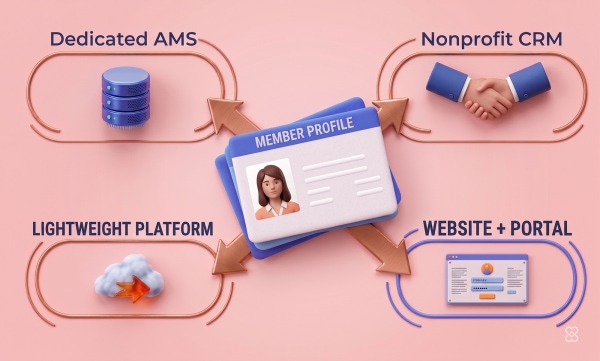
4 categories of member-management software, matched to association size and complexity |
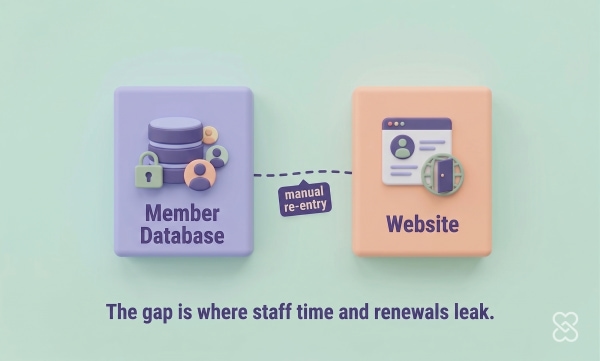
2 systems most associations run a member database and a website, and the gap between them is where data breaks |
1 framework we use this same decision process before we integrate any member system with a site |
Quick answer: Association management software (AMS) is a platform that stores member records and runs the work of membership — dues, renewals, events, communications, and a member portal. There is no single best option. The right choice depends on three things: how large your membership is, how complex your structure is (chapters, tiers, certifications), and whether the system connects cleanly to your website. Small, volunteer-run groups are best served by lightweight all-in-one platforms; mid-to-large associations with chapters or certifications need a dedicated AMS; and any association should treat the link between its member database and its website as a first-order decision, not an afterthought.
Why a Framework Beats a Top-10 List
A ranked list assumes every association needs the same thing. They do not. A 300-member local society and a 40,000-member national trade association are not shopping for the same product.
Every “10 best” list puts an enterprise platform built for national associations in the same numbered list as a tool designed for a volunteer running things from a laptop. Ranked side by side, the enterprise tool “wins” on features. That is exactly the wrong conclusion. The right software is the one that matches your size, your structure, and your staff — and the cheapest tool on the list can be the right answer for one association and a costly mistake for another.
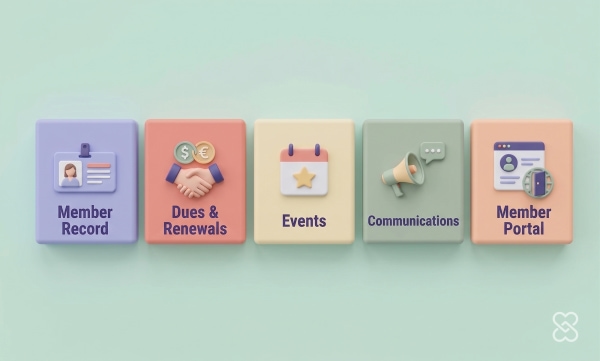
So before any product names, define the job. A real association management system has to do five things well:
- Hold the member record — one source of truth for contact details, membership type, join date, and status.
- Run dues and renewals — automated invoices, reminders, grace periods, and self-service renewal.
- Manage events — registration, tiered and member pricing, and attendance tied back to the member record.
- Communicate — segmented email to members, committees, chapters, or lapsed members.
- Power a member portal — a logged-in area where members update their profile, pay, register, and access member-only content.
Hold every product against those five jobs and the market sorts itself into four clear categories.
Reviewed by Our Team
This guide reflects firsthand work, not vendor marketing. We build the websites and member portals that sit on top of these systems, which means we see what each one actually does once real staff and real members start using it.
 Brent Lafreniere, Digital Director (UX, Integrations & Strategy) — 19 years in the mission-driven CMS space across nonprofits, schools, associations, and healthcare. Specializes in website development, UX, accessibility, SEO, and the practical work of connecting member databases to websites without creating duplicate data entry.
 Murad Bushnaq, CEO & Creative Director (Strategy, UX & Platform) — 25+ years in web design, 15+ focused on nonprofits, schools, associations, and healthcare. Founded the Morweb CMS and has guided 500+ sites for organizations including the Microscopy Society of America, United Way, and Engineers Without Borders USA. Works from a simple rule: strategy before technology.
 Bita Goli, Senior Designer (Member UX & Design) — 5+ years in UX, typography, and visual design across all four of Morweb’s verticals. Focuses on how members actually move through renewal, registration, and portal flows.
 Steven Calibo, Digital Strategist (Analytics & SEO) — 15 years in digital strategy across all four verticals. Google Analytics, Google Ads, HubSpot, and CRO certified. Looks at where members drop off in renewal and registration flows and what the data says about it.
The Four Categories of Association Software
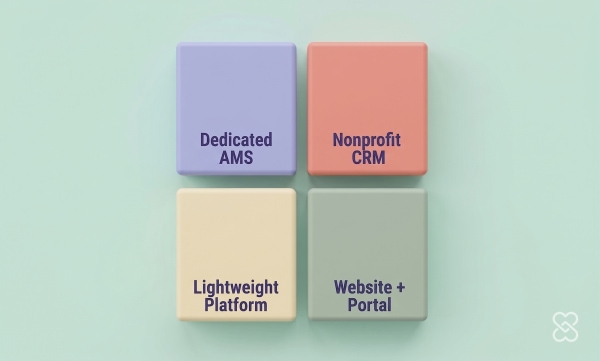
Almost every tool marketed to associations falls into one of four categories. Knowing which category you are shopping in is more useful than any single product comparison.
1. Dedicated Association Management Systems (AMS)
A dedicated AMS is built from the ground up for member-based organizations. Examples include NetForum, Fonteva (built natively on Salesforce), Personify360, and iMIS. These handle the things that break general-purpose tools: chapters and components, multiple membership tiers, certifications and continuing education, committees, and complex dues structures. They are powerful and they are the right answer for mid-to-large associations with real structural complexity. The trade-off is cost and staffing. An enterprise AMS expects you to have someone who owns it. If you do not have dedicated staff or an implementation budget, an enterprise AMS becomes a system you pay for and underuse.
2. Lightweight All-in-One Membership Platforms
These bundle membership, dues, events, email, and a basic website into one affordable subscription. Examples include Wild Apricot, ClubExpress, MemberClicks, and VeryConnect. For a small or volunteer-run association, this category is often exactly right: one login, predictable pricing, and no developer required. The trade-off is ceilings. The design templates are limited, the reporting is basic, and the member-facing experience can feel dated. In our evaluation calls, association leaders frequently describe these tools as fine to start on but “mediocre” once membership grows past a few hundred and expectations rise.
3. Nonprofit and Constituent CRMs Adapted for Associations
These are CRMs built primarily for fundraising and constituent management, then stretched to cover membership. Examples include Salesforce (Nonprofit Cloud, formerly the Nonprofit Success Pack), Bloomerang, Neon CRM, and Fundly CRM. They shine when your association raises money as much as it manages members — foundations, advocacy groups, mission-driven societies. The watch-out is membership mechanics: native dues automation, renewals, and certification tracking are often weaker than in a true AMS and may need configuration or add-ons. One more thing to verify: many trade associations are 501(c)(6) organizations, and the nonprofit discounts these CRMs advertise usually require 501(c)(3) status. Do not assume you qualify for the “free for nonprofits” pricing.
4. The Website and Member Portal Layer (CMS)
This is the public-facing site and the logged-in member portal — the part members and prospects actually see. A CMS like Morweb is not a member database and should not pretend to be one. Its job is to present your association well, give non-technical staff control over content, and connect to whichever system in categories 1 through 3 holds your member data. This is the category most associations underweight, and it is where the worst day-to-day pain lives. A strong member database behind a confusing, hard-to-update website still fails the member trying to renew at 9pm.
“Associations do not fail because they picked the wrong product. They fail because they picked the wrong category for their size. We see small societies drowning in an enterprise AMS, and growing associations duct-taping a hobbyist tool. Match the category to the organization first, then compare products inside it.”
— Murad Bushnaq, CEO & Creative Director
Association Software Compared by Category
Here is how the four categories stack up against the work an association actually does, and who each one fits.
|
Category |
Best for |
Strengths |
Watch-outs |
Example tools |
|
Dedicated AMS |
Mid-to-large associations with chapters, tiers, or certifications |
Deep membership mechanics, complex dues, certifications, committees, reporting |
High cost; needs dedicated staff and an implementation budget |
NetForum, Fonteva, Personify360, iMIS |
|
Lightweight Platform |
Small or volunteer-run associations and societies |
Affordable, all-in-one, no developer required, fast to launch |
Limited design, basic reporting, dated member experience as you grow |
Wild Apricot, ClubExpress, MemberClicks, VeryConnect |
|
Nonprofit / Constituent CRM |
Associations where fundraising matters as much as membership |
Strong donor and constituent data, advocacy, grant and gift tracking |
Weaker native dues/renewals; 501(c)(6) orgs often miss nonprofit pricing |
Salesforce, Bloomerang, Neon CRM, Fundly CRM |
|
Website + Member Portal |
Every association (this is the layer members see) |
Professional public site, easy editing for non-technical staff, member portal |
Not a member database; must integrate with the system that holds member data |
Morweb and comparable CMS platforms |
How to read this: categories 1, 2, and 3 are alternatives — you pick one to hold your member data. Category 4 is not an alternative to the others; it is the layer that sits on top of whichever you choose. The most common, most expensive mistake is treating the website as optional and letting it drift out of sync with the member system.
A note on pricing: we deliberately do not publish per-month figures here. Vendor pricing for this category has shifted repeatedly, and most published “best of” lists quote numbers that are already wrong. Get current pricing in writing from the vendor, and ask specifically about implementation fees, per-transaction charges on dues and event payments, and the cost to add staff logins.
The Mistake That Costs Associations the Most
The most expensive problem we see is not a bad product choice. It is two systems that do not talk to each other.
Here is the pattern. The association picks a member database. Separately, it has a website — often older, often built by someone who has since left. The two are not connected. So when a member updates their email or renews, a staff member re-keys it from one system into the other. When the website lists events, someone copies them over by hand. This is “dual manual entry,” and it is the quiet tax that eats a sole administrator’s week.
It gets worse at renewal. If a member has to log in to one system, then jump to a different-looking website to pay, the drop-off is real. Members abandon flows that look broken or unfamiliar, and lapsed members are far harder to win back than renewing ones are to keep. When we audit association renewal flows, the handoff between the website and the member system is the single most common place we find members falling out.
“In our work with associations, the biggest hidden cost is almost never the software license. It is the hours one or two staff spend moving the same data between a member database and a disconnected website, and the renewals that quietly leak when those two systems hand members off badly.”
— Brent Lafreniere, Digital Director
This is why we treat the website-to-database connection as a first-order decision. We build sites for associations like the American Association for Homecare, the Microscopy Society of America, and the Greater New York Automobile Dealers Association — organizations that run advocacy, journals, certifications, and major events, where the website is not a brochure but the place members actually transact. In every one of those cases, the question is not just “which member system,” but “how cleanly does the site members live on connect to it.”
How to Choose Association Management Software
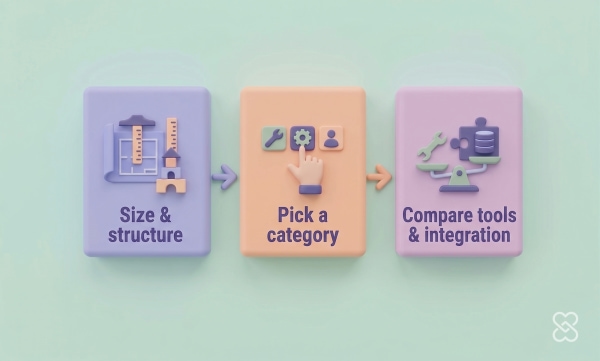
Start with your association, not with a product. Match the category to your size and structure first, then compare tools inside that category.
|
If your association looks like... |
Start with this category |
Why |
|
Under ~500 members, volunteer-run, simple dues |
Lightweight Platform |
Affordable, all-in-one, no developer needed. Do not overbuy. |
|
Growing, multiple tiers, events that matter, 1–3 staff |
Lightweight Platform or Nonprofit CRM + a real website |
You are outgrowing the basics. Prioritize the member experience and the site connection. |
|
Chapters, certifications, large or national membership |
Dedicated AMS |
Only a purpose-built AMS handles this complexity reliably. |
|
Fundraising or advocacy is core to the mission |
Nonprofit / Constituent CRM |
You need donor and constituent depth, not just membership. |
Once you know your category, run this short process:
- Write down your five jobs and rank them. Member record, dues/renewals, events, communications, portal. Be honest about which two matter most. A society that lives on its annual conference should weight events heavily; a trade association built on advocacy should weight communications.
- Map your structure. Chapters, tiers, certifications, committees. If you have these, you are likely in the dedicated-AMS category and should not waste time demoing tools that cannot model them.
- Count your staff honestly. Who will own this system on Monday morning? If the answer is “one person who also runs communications and events,” favor simplicity over power.
- Demand the integration answer. Ask every vendor exactly how member data flows between their system and your website. “We have an API” is not an answer. Ask what syncs, in which direction, how often, and what it costs.
- Get pricing in writing, including the extras. Implementation, payment-processing fees, staff seats, and the cost to export your data if you leave.
- Test the member’s path, not the admin demo. Make the vendor show you a member renewing and registering for an event from the public website, end to end. That is the experience that retains members.
Association Management Software: Common Questions
What is association management software?
Association management software (AMS) is a platform that stores member records and runs the core work of membership: dues and renewals, event registration, communications, and a logged-in member portal. It replaces the spreadsheets, separate email tools, and manual processes that most associations start with, putting member data in one place.
What is the difference between an AMS and a CRM?
An AMS is built specifically for member-based organizations, so dues, renewals, chapters, and certifications are native. A CRM (customer or constituent relationship management) is built primarily to track relationships and, in the nonprofit world, donations. CRMs can manage membership, but membership mechanics are usually an add-on rather than the core. Choose an AMS when membership structure is complex; choose a CRM when fundraising and constituent relationships are as important as dues.
What is the best association management software?
There is no single best option, and any list that claims one is ignoring how different associations are. The best choice depends on your size, your structure, and your staff. A small volunteer-run society is usually best served by a lightweight all-in-one platform like Wild Apricot or ClubExpress, while a large association with chapters and certifications needs a dedicated AMS like NetForum, Fonteva, or iMIS. Match the category to your association first, then compare products inside it.
Does my association website need to connect to our member database?
Yes, and it is one of the most important decisions you will make. When the website and the member database are not connected, staff end up re-entering the same data in two places, and members hit a confusing handoff when they try to renew or register. Both problems cost you — in staff hours and in lapsed members. Treat the integration between your site and your member system as a requirement, not a nice-to-have.
How much does association management software cost?
Pricing ranges widely, from affordable monthly subscriptions for lightweight platforms to five- and six-figure annual costs for enterprise systems. We do not publish specific figures because vendor pricing in this category changes often and most lists quote outdated numbers. When you evaluate, get current pricing in writing and ask specifically about implementation fees, per-transaction charges on dues and event payments, the cost of additional staff logins, and what it costs to export your data if you leave.
Can a small association run everything from one platform?
Often, yes. Lightweight all-in-one platforms are designed exactly for small and volunteer-run associations that want membership, dues, events, email, and a basic website in one subscription without hiring a developer. The trade-off is that design, reporting, and the member-facing experience are more limited. Many associations start there and move to a dedicated AMS, with a stronger website layer, as they grow past a few hundred members.
Building your association software stack? These related guides go deeper on the pieces around your member system:
The Best Association Websites: What the Strong Ones Do Differently. See how leading associations structure their public site and member experience.
Membership Website Builders: How to Choose the Right Platform. A closer look at the website and portal layer that sits on top of your member data.
Association Management Software: A Deeper Look at Member Data. More on how member data should be structured and maintained.

Ready to see how your website and member system should work together?
We build association websites and member portals that connect cleanly to whatever member system you choose, so your staff stop re-entering data and your members stop dropping out of renewal. We can review your current setup and show you where the gaps are.